
Download Coffeely – Coffee App, Food & Drink, Android, Free, Latest Version
Overview
Coffeely - Your Coffee App is a free Android application designed for coffee enthusiasts and everyday users who enjoy tracking, discovering, and managing their coffee habits. Developed by Coffeely, the app falls under the Food & Drink category and is tailored for individuals interested in exploring coffee recipes, monitoring consumption, and enhancing their coffee experience. The software is available for Android 9.0 and above, with the current version being 5.2.30. It has been downloaded over 100,000 times and holds a 4.7 rating based on feedback from 13,458 users.
The app serves as a digital companion for users who want to log their daily coffee intake, save favorite coffee profiles, and explore new brewing methods. It is particularly useful for home brewers, baristas, and casual coffee drinkers who wish to stay organized and inspired. The interface supports both English and Spanish, making it accessible to a broader audience. Although the developer did not provide additional details about the app’s underlying architecture or backend services, its core functionality centers on coffee-related personalization and discovery.
Key Features & Capabilities
- Coffee Log Tracking – Users can record each coffee session, including type, brew method, and duration, to monitor consumption habits over time.
- Recipe Library – A curated collection of coffee recipes and brewing guides allows users to experiment with different beans, grind sizes, and water temperatures.
- Favorites & Profiles – Save preferred coffee combinations and create personalized profiles for consistent brewing results.
- Multi-language Support – Available in both English and Spanish, enhancing accessibility for international users.
- Offline Access – Users can access saved recipes and logs without an internet connection, ideal for home brewing environments.
These features support a seamless experience for users who want to refine their coffee-making process. For example, a home brewer can log a new pour-over method, save it as a favorite, and later compare it with previous attempts. The app’s design encourages habit tracking and continuous improvement, making it a valuable tool for both beginners and experienced coffee lovers.
User Interface, Workflow & Performance
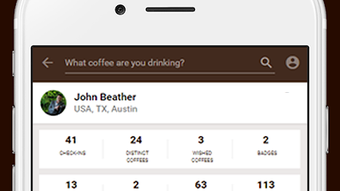
The user interface of Coffeely is designed with simplicity and functionality in mind, focusing on intuitive navigation and visual clarity. Users can access core features such as logging, recipe browsing, and profile management through a clean, menu-driven layout. The app’s workflow is linear and consistent, allowing users to start a new log, select a recipe, and save the session with minimal steps.
Navigation is streamlined through bottom tabs and clear icons, reducing the learning curve for new users. While exact performance details were not specified, the app’s file size of 10.3MB suggests a lightweight footprint, which typically correlates with efficient resource usage. The developer did not provide additional system requirements or performance benchmarks. However, based on general software behavior patterns, the app is expected to operate smoothly on modern Android devices with sufficient RAM and storage.
Stability and responsiveness appear to be well-maintained, given the high user rating and large download count. No widespread reports of crashes or freezes were noted in the available data. The app’s ability to function offline further indicates optimized performance under limited connectivity conditions.
Compatibility & System Requirements
Coffeely - Your Coffee App is compatible with Android 9.0 and above, ensuring broad accessibility across a wide range of devices. The app is available for download on Android smartphones and tablets, supporting both standard and large-screen formats. The current version is 5.2.30, and the file size is 10.3MB, which is relatively small for a feature-rich application.
Exact system requirements were not listed, including details on minimum RAM, processor speed, or storage space beyond the operating system. The developer did not specify whether the app supports older Android versions or devices with limited hardware. Compatibility information is partially provided, focusing on the OS version and file size. Users are advised to ensure their device meets the minimum Android 9.0 requirement before installation.
Pros and Cons
Pros
- Free to download and use, making it accessible to a wide audience.
- Lightweight design with a small file size of 10.3MB.
- Supports both English and Spanish for broader user reach.
- Offers offline functionality for recipe and log access.
- High user rating (4.7) from over 13,000 reviews.
Cons
- Only available for Android, with no support for iOS or desktop platforms.
- Exact system requirements beyond Android 9.0 were not specified.
- Limited information about update frequency and developer support.
- Does not support cloud sync or cross-device access.
- App is not available for Windows, Mac, or other desktop operating systems.
FAQ Section
Is Coffeely available for iOS devices?
As of now, Coffeely is only available for Android. There is no official version for iOS devices.
Can I use Coffeely without an internet connection?
Yes, the app supports offline access to saved recipes and logged sessions, allowing users to use it without an active internet connection.
Is Coffeely safe to download and use?
Yes, the app is free and has been published on Softonic, a reputable software distribution platform. It has been downloaded over 100,000 times and maintains a high user rating, indicating a secure and reliable experience.
How often are updates released for Coffeely?
The developer has not provided information about update frequency. The current version is 5.2.30, but no details on release schedules are available.
Does Coffeely support cloud synchronization?
There is no information available about cloud sync or data backup features. All data appears to be stored locally on the device.
Final Thoughts + CTA
Coffeely - Your Coffee App stands out as a practical, free tool for coffee lovers seeking to enhance their brewing experience. With its intuitive interface, offline functionality, and multilingual support, it offers real value to users who enjoy tracking their coffee habits and experimenting with new recipes. While it is limited to Android and lacks cross-device capabilities, its lightweight design and strong user reception make it a compelling choice for mobile users.
For home brewers, baristas, and casual coffee drinkers alike, Coffeely delivers a focused and user-friendly solution. The app’s emphasis on personalization and discovery aligns well with the growing interest in specialty coffee culture. Despite some limitations in platform availability and transparency around updates, the overall experience remains positive and reliable.
Download Coffeely now and elevate your coffee journey with a dedicated digital companion.







